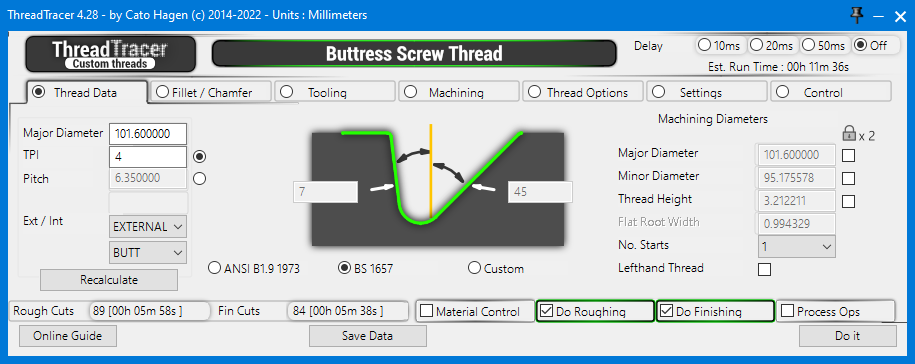
ThreadTracer uses a tabbed interface to present its parameters to you. Whatever thread is selected will have the appropriate thread data displayed on the first tab.
Switching between the different thread types are found in the Control tab. You will find descriptions for all input boxes and options in these pages.
Click the 'Online Guide' button in the plugin and it will open this online documentation in your web browser.
Buttress Thread \\ Thread Data Tab (Tab 1):
Set the Major diameter for the buttress thread. If you work in metric, enter metric diameter, if inch, enter inch diameter.
ThreadTracer will calculate the correct thread form for the selected Buttres type, based on a given Major diameter.
There are 2 standards built in, and will generate the thread profile based on diameter and TPI.
Any Major and Minor diameters for the spesific standard must be supplied from the datasheet for the corresponding thread.
TPI and Pitch
Enter the TPI or pitch of the thread. Select to use TPI or pitch with the radio button.
Select from the dropdown if the Buttress thread are external or internal.
Select from the dropdown the orientation for the trailing and pressure flank.
For both ANSI B1.9 and BS 1657 the trailing and pressure flank are set to 45/7° and are controlled by the 'PUSH-BUTT' or 'BUTT' dropdown, depending what side the pressure flank should be.
When the designation 'BUTT' is used, the thread is "pull" type buttress (external thread pulls) with the clearance flank leading and the 7° pressure flank following.
When the designation 'PUSH-BUTT' is used, the thread is a "push" type buttress (external thread pushes) with the 7° load flank leading and the 45° clearance flank following.
This description should be comfirmed by a simplified view showing thread angles on the drawing of the product.
Recalculate : Always click this button after the above entries have been changed, to calculate the correct new diameters, radiuses and flat root for machining.
When switching between External and Internal thread, you might get red alert boxes around the machining diameters, press the recalculate button again to correct the mean machining diameters.

Select thread standard to use when calculating.
ANSI B1.9 1973 - American Buttress, angles for flank are locked to 45/7°
BS 1657 - British Standard 1657 Buttress, angles for flank are locked to 45/7°
Custom - For Custom Buttress or ratchet threads, use this to set custom flank angles on the thread profile.
Enable input boxes for Major and Minor Diameter, and adjust to the required machining diameters.
Major Diameter : Value here is the Major Diameter of the thread for machining.
Minor Diameter : Value here is the Minor Diameter of the thread for machining.
Tolerances for the spesific standard must be supplied from the datasheet for the corresponding thread and applied here.
 Thread Height : Value here will be the calculated thread height from the Major and Minor diameters above.
Flat Root Width : This value are automatically calculated from the selected thread specifications and can not be changed. It can be only be edited when you select 'Custom' thread'.
No. Starts : Select number of starts, if the thread is multistart.
Lefthand Thread : Check this if its a lefthand thread.
Thread Height : Value here will be the calculated thread height from the Major and Minor diameters above.
Flat Root Width : This value are automatically calculated from the selected thread specifications and can not be changed. It can be only be edited when you select 'Custom' thread'.
No. Starts : Select number of starts, if the thread is multistart.
Lefthand Thread : Check this if its a lefthand thread.
Under the Padlock symbol are 3 checkboxes to edit and lock diameters, if the two upper boxes are checked, the thread height will always be calculated from the two locked numbers.
Locking Major Diameter and Thread Height, the Minor Diameter will be calculated with using the locked numbers.
Only 2 numbers can be locked, if all three are locked, it will by default always use Major and Minor diameter and then calculate thread height.
If you edit a diameter and enter a wrong number or deletes the entry, clicking 'Recalculate' will restore the numbers back to initial values.
Page accessed: 19476 times
