
ThreadTracer uses a tabbed interface to present its parameters to you. Whatever thread is selected will have the appropriate thread data displayed on the first tab.
Switching between the different thread types are found in the Control tab. You will find descriptions for all input boxes and options in these pages.
Click the 'Online Guide' button in the plugin and it will open this online documentation in your web browser.
Trapezoidal Thread \\ Thread Data Tab (Tab 1):
Nominal : Enter the nominal for the thread. The trapezoidal thread standards are metric, so Nominal needs to be in metric.
-If you work in inches, all the diameters used for machining will be converted to inches.
TPI : Trapezoidal metric thread does not use TPI.
Pitch : Pitch of the thread in millimeters.
Tolerance : 7c, 8c, 9c, 7e, 8e, 9e for external Trapezoidal thread.
 Tolerance : 7H, 8H, 9H for internal Trapezoidal thread.
 External / Internal : Select from the dropdown if the thread are external or internal.
Recalculate : Always click this button after the above entries have been changed, to calculate the correct new diameters, radiuses and flat root for machining.
External / Internal : Select from the dropdown if the thread are external or internal.
Recalculate : Always click this button after the above entries have been changed, to calculate the correct new diameters, radiuses and flat root for machining.
When switching between External and Internal thread, you might get red alert boxes around the machining diameters, press the recalculate button again to correct the mean machining diameters.

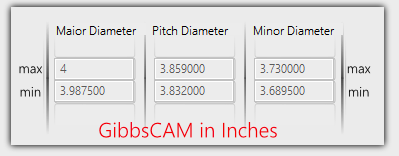
Calculated after clicking Recalculate button
Major Diameter, these are the max and min values allowed for Major Diameter, from current entered Nominal.
Pitch Diameter, these are the max and min values allowed for Pitch Diameter, from current entered Nominal.
Minor Diameter, these are the max and min values allowed for Minor Diameter, from current entered Nominal.
If you work in inches, all calculated diameters are shown in inches

Select thread standard to use when calculating.
ISO 2904 - 2016
DIN 30295
If GibbsCAM is set to Inch, the numbers here are automatically converted to inch.
Major Diameter : Value here is the calculated mean value between max/min from the thread table.
Minor Diameter : Value here is the calculated mean value between max/min from the thread table.
Thread Height : Value here is the calculated thread height, from the two numbers above.
Flat Root Width : Value here is the calculated minimum flat root width allowed from thread specification.
No. Starts : Select number of starts, if the thread is multistart.
Lefthand Thread : Check this if its a lefthand thread.
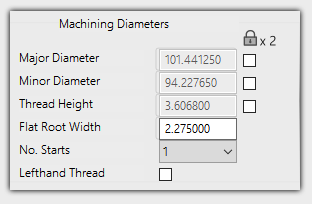
Under the Padlock symbol are 3 checkboxes to edit and lock diameters, if the two upper boxes are checked, the thread height will always be calculated from the two locked numbers.
Locking Major Diameter and Thread Height, the Minor Diameter will be calculated with using the locked numbers.
Only 2 numbers can be locked, if all three are locked, it will by default always use Major and Minor diameter and then calculate thread height.

If you edit a diameter and enter a wrong number or deletes the entry, clicking 'Recalculate' will restore the numbers back to initial values.
Page accessed: 2762 times
