
Freeform Thread \\ Tooling (Tab 3):
Select what type of tool to use for machining the thread.
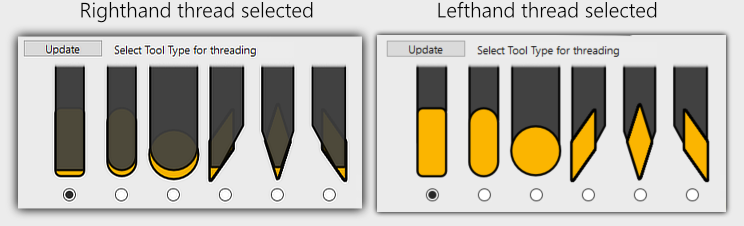
Tools shown in the window will be correctly represented for Righthand and Lefthand threads, click the Update button if they are not shown correctly.
Supported tools
Grooving tool, rectangular with radius on corners.
Grooving tool, with full radius.
Round Insert (Button Insert).
Diamond Insert - Pointing towards the main spindle.
Diamond Insert - Pointing straight down.
Diamond Insert - Pointing away from the main spindle. (Points towards the sub-spindle)
Use the 3 radio buttons to select where on the insert/tool presetter you measured the Z offset for the tool. (right/left side or center)

Tool presetter Z axis touch off point : Left Side

Tool Z axis Zeropoint : Center

Tool presetter Z axis touch off point : Right Side
Insert Width : Enter the insert width for grooving tools. For diamond tools this input box is disabled.
Insert Radius : Enter the insert corner tip radius. On diamond tools this is the tip radius.

Tool Geometry & Tool Parameters
Enter the insert face relief and Inscribed Diameter for diamond tools. A standard holder will usually hold the insert with a 5 degree face relief.

Face Relief
From the dropdown, select diamond style for insert. ISO V-STYLE 35°, D-STYLE 55° and C-STYLE 80° are supported.
Its important to select the correct style,
Face Relief and
Inscribed Diameter as the geometry of the tool are used to detect tool gouging against the thread profile.
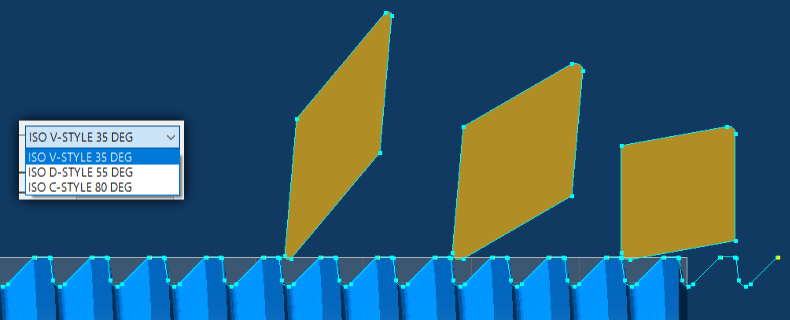
ISO V-STYLE 35°, D-STYLE 55° and C-STYLE 80° Diamond Style Inserts
ThreadTracer will always build a new formtool with the shape defined by insert width and insert radius.
If a diamond tool is selected, it will build this tool with style selected, insert radius and face relief.


If you need to define your own tool, its important to set the same tool parameters as insert width and insert radius.
You can define your own tool by editing the existing tool built by ThreadTracer, as long as the
Comment is not changed. ThreadTracer will continue to use this tool when creating new threading operations.
You can also copy the tool comment line from a generated tool into an existing tool. Then delete the generated tool and create GibbsCAM operations for the thread and it will use the same tool.
This way you can define your tool to be used in multiaxis machines with multiple tool groups and sub spindle.
Tool Comments built by ThreadTracer always look similar like this :
ThreadTracer EXT TG=0 HAND=R GROOVE CW=3 R=1.5 PRESET=1
ThreadTracer  = plugin name
EXT           = external thread
TG=0          = toolgroup
HAND=R        = right hand
GROOVE        = tool type
CW=3          = insert cutting width
R=1.5         = insert radius
PRESET=1      = tool presetter position
B-axis machines and toolholder orientation (Back to top)
B-Axis Tilt : Set the B-axis tilt in degrees. For B-axis machines, the angle set here will be used when creating the tool for machining.
You may experiment here what values to set with a B-axis machine, if the tool requires the B axis to be rotated 45° for the tool to be correct,
the value in ThreadTracer may be 45° (or -45°)

Page accessed: 995 times
