Tool Tab
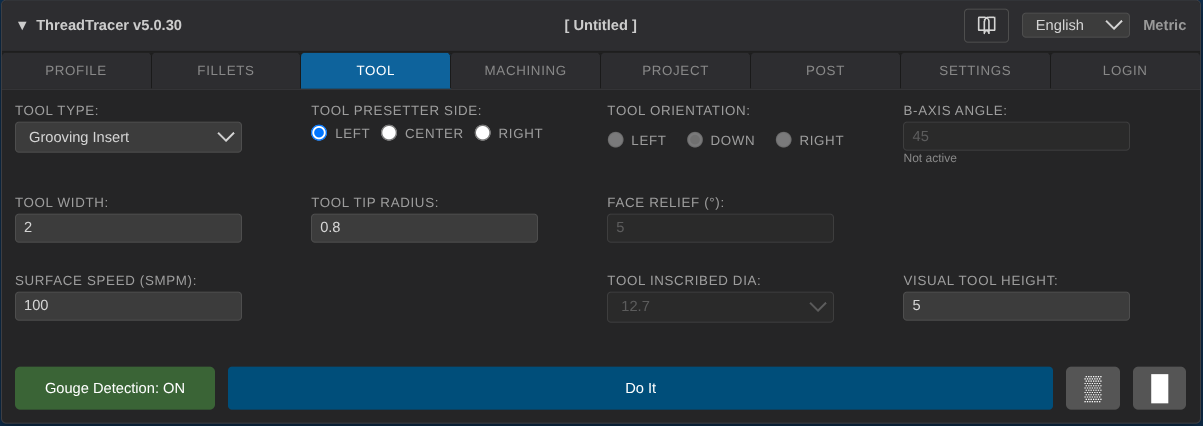
Here you can define and setup the tool you want to use for machining.
Tool Type
Chooose the type of insert for machining the threead.
- Grooving Insert
- Button Insert
- ISO-V 35 Deg
- ISO-D 55 Deg
- ISO-C 80 Deg
Tool Presetter Side
Select the side where the tool presetter is used to touch off the tool for the Z axis.
- Left
- Center
- Right
Tool Orientation
Select the tool holder orientation for ISO diamond tools.
- Pointing Left
- Pointing Down
- Pointing Right
B-Axis Angle
Set a fixed angle for millturn machines with a B-axis. (currently disabled and have no effect)
Tool Width
Set the width of the tool when Grooving insert is selected.
Always verify from the label or data from the tool insert manufacturer and set correct tool width.
This tool width affects how the tool accurately follows the thread profile.
Tool Tip Radius
Set radius of the tool tip, applies for all tools.
Always verify from the label or data from the tool insert manufacturer and set correct tool radius.
This tool radius affects how the tool accurately follows the thread profile.
Face Relief
Set face relief for ISO Diamond inserts. Default is 5 degrees face relief.
The angle you set here affects how the insert is oriented when calculating the tool path and Gouge Detection is enabled.
If you set another angle here, you have to make sure the tool holder in the machine holds the insert with the the same face relief.
If in doubt, you can always search for the holder part number on the manufacturers website and confirm the face relief.
Surface Speed (SMPM or SFPM)
Set the surface speed for machining with current insert, set in SMPM when working in metric and SFPM when working in inches.
The spindle RPM with be calculated automatically based on this surface speed and diameter of thread when posting G-code.
Keep in mind when using Grooving insert for threading, the insert is also getting cutting forces applied sideways so try to keep the surface speed on the low end.
Tool Inscribed Dia
Select the Tool Inscribed Diameter for ISO diamond tools.
- 6.35 mm (1/4")
- 9.52 mm (3/8")
- 12.7 mm (1/2")
Tool Height
Set the visual height of the tool on screen when Grooving insert is selected.
The visual height have no effect on other inserts, and no effect in any toolpaths or machining.